What This Log Shows
A capping rule that fires is invisible everywhere else. Clicks simply stop being accepted, which from the outside looks identical to a tracking failure. This log makes the cause explicit.
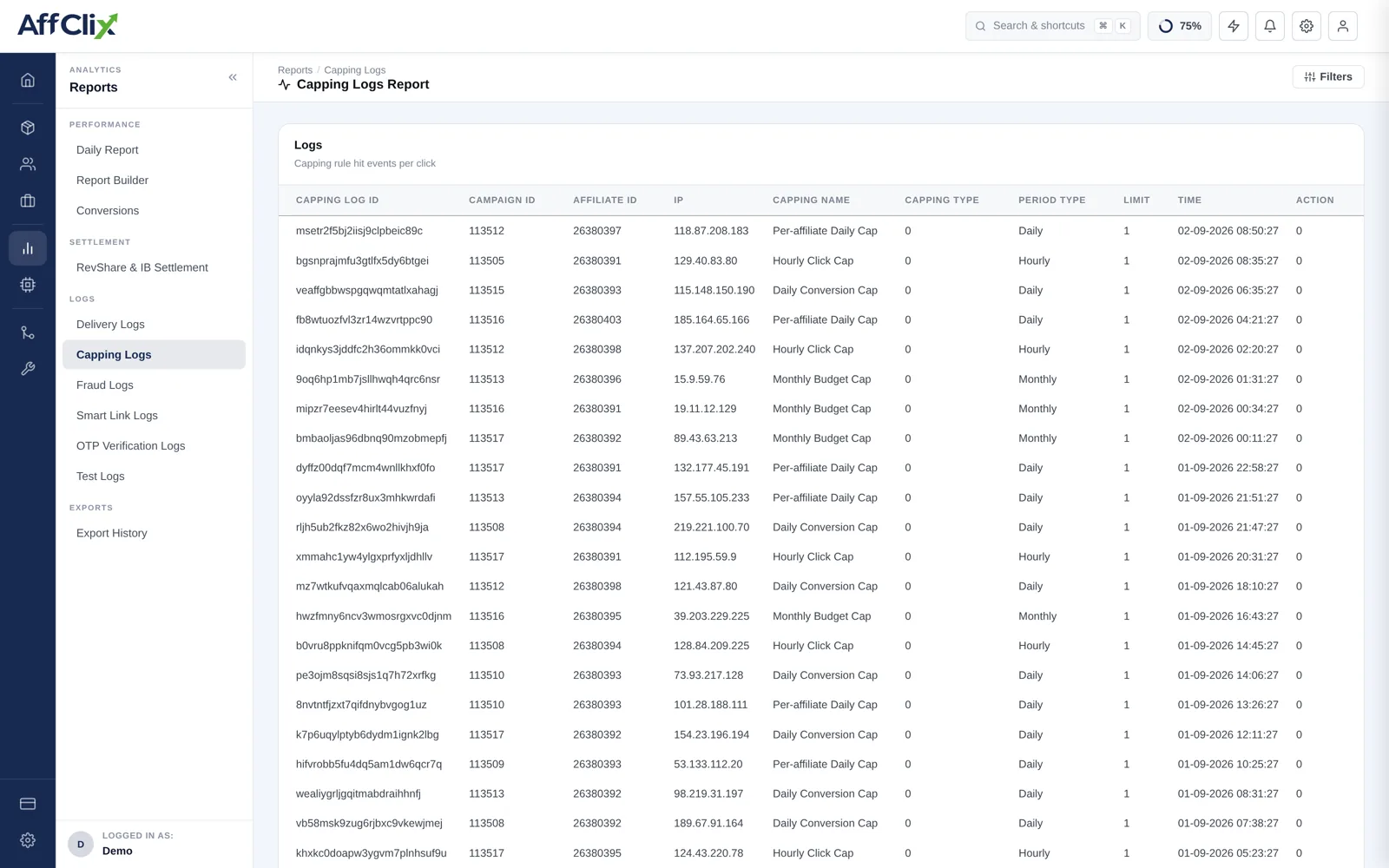
Column Reference
| Column | Meaning |
|---|---|
| Capping ID | The rule that fired, so you can find it on the campaign's Capping tab. |
| Campaign ID | The campaign the cap applied to. |
| Affiliate ID | The affiliate whose traffic hit the cap. Populated for per-affiliate rules. |
| Cap Name | The name you gave the rule. Descriptive names pay for themselves here. |
| Capping Type | What was being counted — conversions, clicks or unique clicks. |
| Period | Hourly, Daily or Monthly. |
| Limit | The threshold that was reached. |
| Time | When the cap was hit. |
Reading the Pattern
The timestamp is the most informative column. What it tells you:
| Pattern | Interpretation |
|---|---|
| Cap hit early every day | The limit is throttling revenue. Renegotiate the volume, or add an hourly cap to spread delivery. |
| Cap hit within minutes of midnight | An affiliate is queueing traffic for the reset. Worth checking the quality of that burst. |
| Cap never appears | The limit is above actual delivery, so it is protecting nothing. That may be fine, or it may be set too high to be a real safeguard. |
| One affiliate hitting a shared cap first | They are consuming volume other partners were promised. Move to per-affiliate caps. |
Periods reset in the campaign timezone
A daily cap rolls over at midnight in the timezone set on the campaign, not UTC and not yours. If the reset time in this log looks wrong, check that setting before assuming a bug.
What to Use It For
Answering an affiliate. "Your traffic stopped at 14:10 because the campaign's daily cap of 250 was reached" is a complete answer.
Renegotiating volume. A rule firing every day is direct evidence for asking an advertiser to raise the cap.
Confirming a new rule works. After setting a cap, check it appears here at the volume you expected.
Ruling capping out. When traffic stops and nothing is logged here, the cause is targeting, status or fraud — not a cap.
Traffic rejected at a cap does not have to be lost. Configure Fallback on the campaign's Anti Fraud tab and capped clicks are redirected elsewhere — see Campaign Capping.